AWStrace: Another Windows Strace
Introduction
There have been a lot of open source atteptms to creating something like strace for Windows. Many have drawbacks or specific/customized setup requirements. This is simply my attempt to make a quick system call tracer that’s easy to use and doesn’t require any complex setup. The code AWStrace is here.
Previous Work
Here are some of the previous attempts at making an strace for Windows:
- NtTrace: Debugger Engine COM Objects - Software Breakpoints https://github.com/rogerorr/NtTrace
- stracent: IAT patching. Pressuembly redirecting to some type of logging - https://github.com/ipankajg/stracent
- STrace: Kernel module and DTrace - https://github.com/mandiant/STrace
I’m sure there are many others I’ve missed.
Requirements
Some of the requirements I wanted for my onw ease of use were:
- No kernel mode (Can’t be something like my CallMon concept)
- No admin required
- Can trace win32k system calls
- Fast (ish)
- Use this for learning more about using Rust for Windows
First Approach
My first idea was to use software breakpoints and use the Debugging COM Interfaces from DbgEng. This would be simmilar to the NtTrace However, the more breakpoints you have the slower the software will run. The exception handling process is relatively slow, and only becomes worse on multithreaded processes. The handler code also adds overhead. For example:
fn Breakpoint(&self, bp: windows::core::Ref<IDebugBreakpoint>) -> windows::core::Result<()> {
    unsafe {
        /*
        We could use IDebugSymbols to find the symbol associated with the breakpoint
        but it's probably faster to get its ID.
        */
        let id = bp.unwrap().GetId().unwrap();
        let temp_state = &self.0;
        // Starting at 0 = RAX, RCX, RDX, RBX, RSP, RBP, RSI, RDI, R8, R9, R10, R11, R12, R13, R14, R15, RIP
        let mut reg_values: [DEBUG_VALUE; 17] = [DEBUG_VALUE::default(); 17];
        temp_state
            .registers
            .GetValues(17, None, 0, reg_values.as_mut_ptr())
            .unwrap();

        print!("{}(", &temp_state.bp_mappings.get(&id).unwrap());
        let a1: u64 = ((reg_values[1].Anonymous.I64Parts32.HighPart as u64) << 32)
            + reg_values[1].Anonymous.I64Parts32.LowPart as u64;
        let a2: u64 = ((reg_values[2].Anonymous.I64Parts32.HighPart as u64) << 32)
            + reg_values[2].Anonymous.I64Parts32.LowPart as u64; // RDX
        let a3: u64 = ((reg_values[8].Anonymous.I64Parts32.HighPart as u64) << 32)
            + reg_values[8].Anonymous.I64Parts32.LowPart as u64; // R8
        let a4: u64 = ((reg_values[9].Anonymous.I64Parts32.HighPart as u64) << 32)
            + reg_values[9].Anonymous.I64Parts32.LowPart as u64; // R9
        let rip: u64 = ((reg_values[16].Anonymous.I64Parts32.HighPart as u64) << 32)
            + reg_values[16].Anonymous.I64Parts32.LowPart as u64;

        print!("{:#2x}, {:#2x}, {:#2x}, {:#2x}, ...);", a1, a2, a3, a4);
        println!("");

    }
    Ok(())
}
Either doing a hash map lookup (bp_mappings was a hash map with an ID associated with the symbol name as a string in &temp_state.bp_mappings.get(&id)) or directly looking up the symbols with the IDebugSymbols interface adds even more overhead time. After almost fully implimenting a solution I stopped because it was just too slow to trace even the most basic GUI programs.
A second approach
Install RWX shellcode into a process and use it to communicate over a named pipe back to the server process. This method will be much faster than using breakpoints. Each system call stub inside ntdll has just enough instructions thanks to the int 0x2E detection test. This gives enough opcodes for our jump shellcode.
Before:
ntdll!NtCreateFile:
00007ffc`a62c2520 4c8bd1          mov     r10,rcx
00007ffc`a62c2523 b855000000      mov     eax,55h
00007ffc`a62c2528 f604250803fe7f01 test    byte ptr [SharedUserData+0x308 (00000000`7ffe0308)],1
00007ffc`a62c2530 7503            jne     ntdll!NtCreateFile+0x15 (00007ffc`a62c2535)
00007ffc`a62c2532 0f05            syscall
00007ffc`a62c2534 c3              ret
After:
ntdll!NtCreateFile:
00007ffc`a62c2520 4c8bd1          mov     r10,rcx
00007ffc`a62c2523 b855000000      mov     eax,55h
00007ffc`a62c2528 50              push    rax
00007ffc`a62c2529 48b800000c0000000000 mov rax,0C0000h
00007ffc`a62c2533 ffe0            jmp     rax
00007ffc`a62c2535 cd2e            int     2Eh
00007ffc`a62c2537 c3              ret
In this example, obviously 0xC0000 is our remote shellcode. Also note that this shellcode is pre-system-call, so the data is written to the pipe before the actual system call instruction executes.
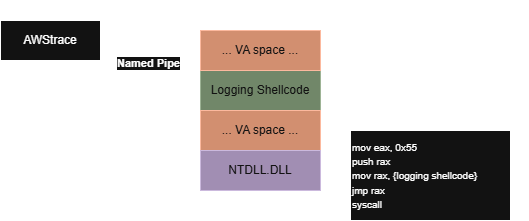
Flawed Logic Warnings
This method is not a 100% way to detect every system call. Malware or other programs that directly use syscall instruction not be traced.
Notes About Using Rust on Windows
The last time I really played around with using Rust to build for Windows was back when there was really only the unoffical FFI bindings crate. Now Microsoft has an offical crate. Being able to use the Rust documentation viewer with this crate has been essential as every API is locked behind some feature of the crate. For example, if you want to use ConnectNamedPipe not only do you need to “use” it with: use Win32::Pipes::ConnectNamedPipe
but also need to make sure you add the Win32_System_Pipes feature in your .toml file. I found that for some of these features I would need to add a new feature to the .toml file just to call a single API. The granulairty of these features also felt a little to small, so many features but still such a narrow group of APIs available. At the end of the day this is really just an organizational opinion. As a final complaint: Null terminated C strings are still kind of annoying to work with.
Advantages
- No Debugger object attached - Can “strace” and debug at the same time.
- No kernel driver required.
Disadvantages
- Doesn’t trap all uses of the
syscallinstruction. - Can only safely trace one process at a time.
- Currently not support for tracing an already running process.
Future Ideas
- Better named pipe support so multiple processes can be traced at the same time.
- Support attaching to an already running process.
- File like
/etc/ltrace.confwhich provides basic type information so system call arguments can be parsed better and provide more detail. For example displaying the actual string in aUNICODE_STRINGstruct. - Need to hook all
win32u.dll(and maybe others) to get all possible win32k system calls. - Improve argument count, and maybe even get return NTSTATUS return value.
Resources
- Windows System Call Table by j00ru
- Assembler: FASM